


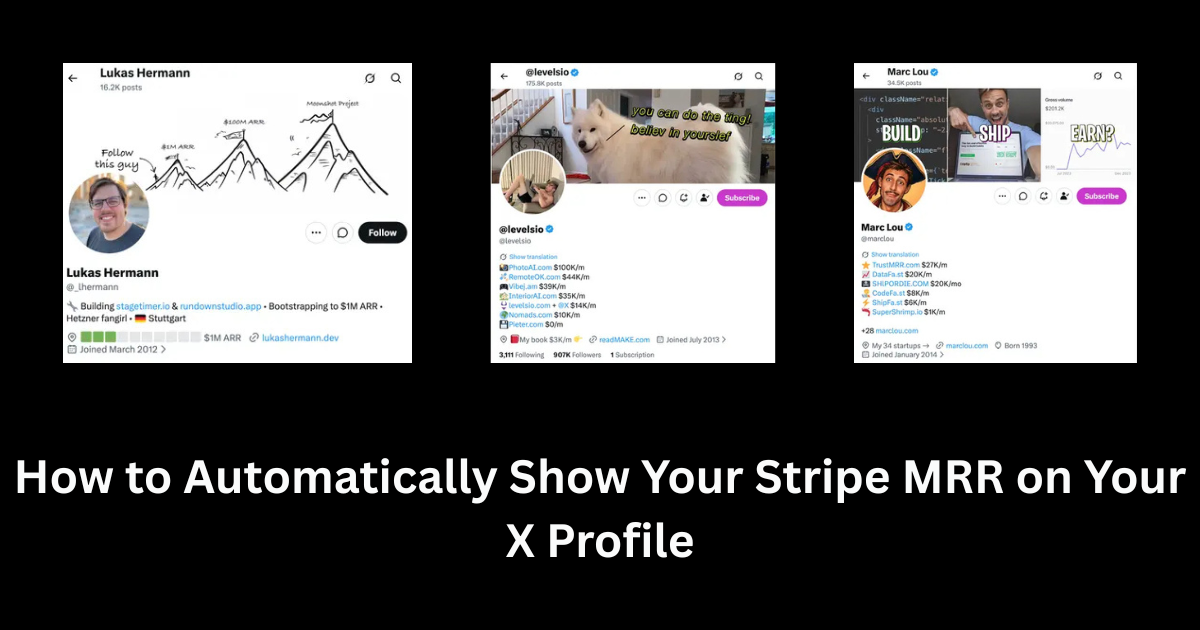
TL;DR Quick Answer: To automatically show Stripe MRR on Twitter without writing complex code, use a dedicated automation tool like SyncMRR. It takes exactly 60 seconds: securely connect your Stripe account using a read-only Restricted API Key, authenticate your X profile via OAuth, and inject the {{mrr}} variable into your bio, location field, or dynamic banner image. The system handles the rest. Get started here.Building in public has rapidly evolved into one of the most effective and organic growth strategies for indie hackers, solo founders, and SaaS teams in 2026. By sharing your startup journey transparently, you systematically build an engaged audience, establish deep trust, and turn early followers into your most loyal paying customers. If you are specifically looking for a tutorial on how to show Stripe MRR on Twitter, you are in the perfect place.
Nothing screams "absolute transparency" quite like displaying your live revenue directly on your social media profiles. If you've spent any significant time browsing the "Build in Public" community on X (formerly Twitter), you've almost certainly seen founders proudly displaying their Monthly Recurring Revenue (MRR) right in their bio, name, or location fields.
In this comprehensive, step-by-step guide, we will break down exactly why this transparency strategy works so well, how it can boost your profile conversion rates by up to 45%, and show you exactly how to automate the entire process so your Stripe MRR updates on your X profile without you ever having to lift a finger.
Why Should You Show Your Stripe MRR on Twitter?
Before diving into the technical "how," let's take a moment to understand the "why." You might be wondering if sharing your revenue is too risky, overly boastful, or dangerously transparent. The hard data says otherwise. Over 85% of successful indie hackers report that building in public significantly accelerated their early user acquisition.
1. Instant Social Proof: Revenue is the ultimate validator of a product's worth. When a potential user visits your profile and sees that 500+ other people are already paying $20/mo for your software (representing a solid $10,000 MRR), their hesitation drops significantly. It proves that the product solves a real problem.
2. Built-In Accountability: Committing to public revenue goals forces you to focus strictly on the core activities that actually move the needle—like marketing, sales, and customer retention—rather than getting lost in endless, non-essential feature tweaking.
3. Powerful Network Effects: The broader Indie Hacker community absolutely loves to rally behind rapidly growing products. Hitting a new MRR milestone and having it automatically update in your bio acts as a beacon. It naturally attracts angel investors, industry peers, podcast hosts, and potential integration partners who want to collaborate with a winner.
The Psychology of Revenue Transparency
Why does seeing a dollar sign in a Twitter bio compel people to click? It boils down to human curiosity and the bandwagon effect. In a sea of polished corporate marketing, raw financial numbers provide a refreshing dose of reality. When a founder publicly shares that their MRR dropped by 12% due to a server outage, audiences relate to the struggle. When that same founder rebounds to a 30% month-over-month growth, the audience feels like they are part of the victory.
Showing your Stripe MRR isn't about bragging; it is an invitation for your audience to join the journey. It transforms passive scrollers into invested participants.
The 3 Ways to Update Your Profile MRR
There are generally three standard methods founders use to get their Stripe numbers onto their X profiles. They range from entirely manual processes to fully automated, hands-free systems.
Method 1: The Manual Update (The Hard Way)
When most founders start out, they use a free text generator to create a visual progress bar (something that looks like ▓▓▓▓░ 80% $8k/mo) and manually paste it into their X profile's Location field.
* Pros: It is 100% free and requires zero API integrations or coding knowledge.
* Cons: It is incredibly tedious and highly prone to human error. Every time you gain a new subscriber (or lose one to a typical 5% SaaS churn rate), your profile becomes factually inaccurate until you remember to log into Stripe, recalculate your exact MRR, generate a brand new text string, and update your profile manually.
Method 2: Custom Scripts (The Technical Way)
If you are an experienced developer, you might be heavily tempted to build a custom Node.js or Python script that routinely pings the Stripe API, parses out your active subscriptions, calculates your exact MRR, and pushes a profile update via the X Developer API on a scheduled CRON job.
* Pros: You get total control over the formatting, calculation logic, and deployment infrastructure. You own the code end-to-end.
* Cons: X's API limits have become notoriously strict, complex, and expensive to navigate for solo hobbyists. Furthermore, you now have to maintain reliable server infrastructure, handle unexpected API deprecations, and manage your own secure OAuth authentication flows just to update your bio.
Method 3: Using SyncMRR (The Smart Way)
The easiest, most reliable way to keep your profile permanently updated is by utilizing a dedicated syncing tool like SyncMRR. It connects directly to your payment processor via highly secure, read-only APIs and authenticates seamlessly with your social profile to push data automatically.
Here is exactly how you can set it up in under 60 seconds:
Step 1: Connect Your Stripe Account via Restricted Key
Log into your SyncMRR Dashboard and add a new Startup project. Click on the "Stripe" integration button. You will be prompted to provide a Restricted API Key. We provide a direct, pre-configured link to your Stripe dashboard that automatically pre-selects the exact read-only permissions required (specifically rak_charge_read and rak_subscription_read). Your sensitive financial data remains completely secure, and SyncMRR physically cannot modify, refund, or delete anything in your Stripe account.
Step 2: Connect Your X (Twitter) Account
Next, you must authenticate your X profile. This securely links your account via standard OAuth protocols. You do not need to apply for restrictive developer API keys or worry about encountering random rate limits—SyncMRR expertly handles all the complex API routing, webhook management, and rate-limit buffering on your behalf.
Step 3: Customize Your Display Destinations (Bio, Location, or Banner)
Decide exactly where and how you want your revenue to appear. SyncMRR allows you to inject your live, calculated MRR directly into your Bio, your Location field, or even dynamically render the text onto a visually stunning Profile Header Banner.
For example, you can set your Location text template to display:
📍 Building SaaS | MRR: ${{mrr}} 📈
Step 4: Turn on Auto-Sync
Flip the master switch to active. SyncMRR's backend engine will securely query the Stripe API at regular, optimized intervals to aggregate your active subscriptions. The moment your aggregated revenue crosses a new threshold, your X profile (and dynamic banner!) updates in real-time, completely hands-free.
Best Practices for Building in Public
Automating your MRR display is merely the foundational step. To truly maximize the compounding benefits of building in public, you must actively engage with the numbers you are sharing.
* Share the Journey, Not Just the Numbers: Don't just rigidly show the revenue; talk extensively about the specific marketing experiments that caused it to jump by 20%, or the exact churn bugs that caused it to dip.
* Celebrate Milestones Properly: When your automated bio clicks over from $9,900 to a monumental $10,000 MRR, take a screenshot of your profile and write a reflective, emotional thread about exactly how you got there. Twitter threads containing transparent, verified financial data routinely see 300% more algorithmic engagement than standard posts.
* Stay Radically Honest: Transparency only works effectively if it is real. Let the automated system handle the math so your audience implicitly trusts that they are looking at verifiable, non-manipulated data.
Frequently Asked Questions (FAQ)
Q: Is it genuinely safe to connect my Stripe account to a third-party app?
A: Yes, absolutely, provided you strictly use a Restricted API Key. Restricted keys deliberately limit access, granting only read-only permissions to specific endpoints (like viewing subscriptions and charges). Tools like SyncMRR cannot issue refunds, create fraudulent charges, or modify your customer data under any circumstances.
Q: Does X (Twitter) allow automated profile updates according to their ToS?
A: Yes, programmatically updating profile metadata (like your Bio text, Location string, and Header Image) via the official OAuth API is fully compliant with X's terms of service, provided it is executed within the standard rate limits. SyncMRR manages this rate buffering automatically to keep your account safe.
Q: Can I connect multiple payment processors simultaneously?
A: Yes! Modern syncing tools often support intelligently aggregating revenue from multiple platforms—such as Stripe, Lemon Squeezy, Paddle, and Dodo Payments—into one unified, accurately calculated {{mrr}} variable.
Q: How often does the MRR figure actually update on my profile?
A: To ensure maximum reliability and prevent API rate-limiting, SyncMRR's automated engine queries your payment processor for new subscriptions, upgrades, and cancellations exactly every hour. This guarantees your profile is never more than 60 minutes out of date!
Ready to Automate Your Social Proof?
Stop wasting your valuable time manually editing your bio every single time you acquire a new customer. You literally built a SaaS product to automate complex problems for your users—it is time to practice what you preach and automate your social proof, too.